Why don't your customers order expensive dishes? (And how Visual Neuromarketing solves it)
Javier Estévez
Editor at Mennu
"The brain processes images 60,000 times faster than text. If your menu doesn't catch the eye, you're losing money before the customer reads the first line."
You have a spectacular sirloin on the menu. It's your star dish, with the best profit margin. But day after day, the plates come back clean to the kitchen... because nobody ordered it.
Is the price the problem? Probably not. The problem is perceived risk.
In this article we analyze why customers are "afraid" to order expensive dishes and how Visual Neuromarketing applied to your digital menu can unlock those sales.
The Diner's Psychology: Loss Aversion
When a customer sees a €28 dish in a text list (as happens with paper menus or basic PDFs), their brain triggers an alert.
The subconscious thought is: "What if I pay €28 and I don't like it? Better to order the €12 burger — I know that's a safe bet."
For the customer to spend more, you need to reduce that perception of risk. And the only way to do it is by stimulating their senses before they pull out their credit card.
We Eat with Our Eyes (Literally)
The optic nerve is 40 times faster than the auditory nerve. It processes the food image long before the customer finishes reading the description.
This is where Visual Neuromarketing comes in. Several studies show that seeing an appetizing food photograph triggers the release of ghrelin, the hunger hormone.
The "Blind Menu" vs. "Visual Menu" Experiment
Imagine two restaurants:
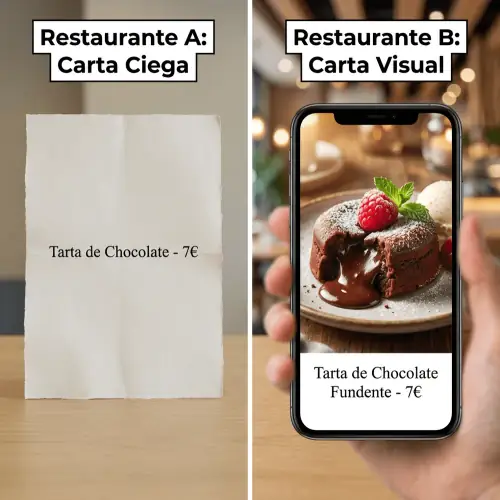
- Restaurant A: Gives you a paper with black text: "Chocolate Cake - €7".
- Restaurant B: Offers you an interactive QR where you see a brilliant photo of melting chocolate, with a vibrant red raspberry on top.
In Restaurant B, the brain no longer thinks about the "cost" of €7, but about the "reward" of the pleasure the photo anticipates. The price fades into the background.
3 Neuromarketing Keys for Your Digital Menu
If you want your customers to order premium dishes, you can't use a static PDF. You need a platform that allows you to apply these techniques:
🎨 Vivid Colors and Saturation
Modern phone screens (OLED/Retina) make food colors stand out more than printed paper. Use photos with vibrant red, orange, and green tones that stimulate appetite.
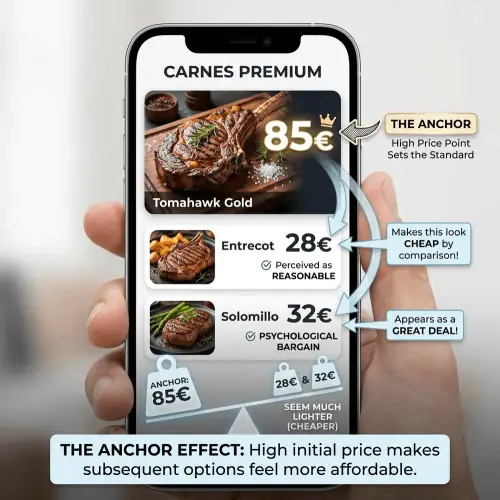
⚓ The Visual Anchor Effect
Place the photo of your most expensive dish (the anchor) at the beginning of the category. Even if they don't order it, it will make the following dishes (with high but lower prices) seem cheap in comparison.
⚡ Remove the Reading Barrier
A tired customer doesn't want to read 4 lines of ingredients. A photo communicates "freshness", "portion size" and "quality" in 0.1 seconds. Make the decision easy.
Why PDFs Kill Impulse Sales
Many restaurant owners make the mistake of uploading a PDF to their website. The problem with PDFs on mobile is:
- Forces you to zoom in (it's annoying).
- Usually has few photos (due to ink costs when designing for print).
- It's a "cold" and administrative experience.
A native Digital Menu, on the other hand, is designed like a delivery app (like UberEats or DoorDash). It's optimized to seduce with large images and touch navigation, replicating the online shopping experience we're all used to.
Conclusion: Make the Expensive Look Irresistible
If you want to sell €30 dishes, your menu must look like €30. A text list stained with oil or a blurry PDF on a phone tells your customer: "they don't care about the details here."
Do your photos sell for you?
Create your visual menu in minutes with our tool and start seducing your customers before they take a single bite.
Create Digital Menu with Photos Now